Canvas
import canvas, { Target, Quad } from "lumen:canvas"
The canvas module is Lumen's renderer: shapes, text, images' backdrop, the draw state, and the transform stack. It is the module a draw() function spends most of its time in.
Everything here is only valid inside draw() (or inside a function draw() calls). Drawing from update() has nothing to draw onto.
Coordinate System
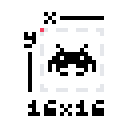
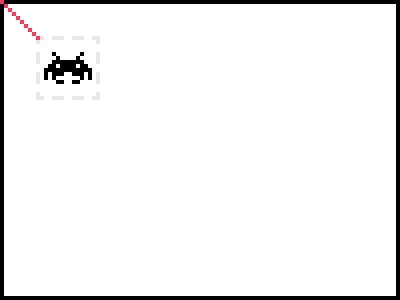
The origin is the top-left of the window, x increasing to the right and y increasing downward. Coordinates are in pixels.
So when you draw a shape to the screen, the x and y coordinates represent the top-left corner of the shape. If you draw a rectangle at x: 10 and y: 10, its top-left corner sits ten pixels right and ten pixels down from the corner of the window.
Circles and arcs are the exception: their x and y are the centre.
Every coordinate passed to the canvas goes through the transform on top of the transform stack, which is how cameras and zoom work.
Setting Colors
Shapes are drawn in the current color, which is set with setColor and stays set until it is changed again — or until the next frame, since the draw state resets before every draw().
canvas.setColor(color.white)
canvas.rectangle(10, 10, 100, 100)
canvas.rectangle(120, 10, 100, 100)

canvas.setColor(color.red)
canvas.rectangle(10, 120, 100, 100)
canvas.rectangle(120, 120, 100, 100)
The current color tints everything drawn, images and text included. Set it back to color.white before drawing sprites you do not want tinted. See Colors.
Shapes
Each shape has an outline version and a filled version taking the same arguments.
| Method | Arguments |
|---|---|
rectangle / filledRectangle | (x, y, width, height) |
circle / filledCircle | (x, y, radius, [segments]) |
ellipse / filledEllipse | (x, y, radiusX, radiusY, [segments]) |
arc / filledArc | (x, y, radius, startAngle, endAngle, [segments]) |
polygon / filledPolygon | (x1, y1, x2, y2, x3, y3, ...) or one list of coordinates |
line | (x1, y1, x2, y2, ...) — any number of points |
point | (x, y, ...) — any number of points |
Angles are in radians. segments controls how many straight edges approximate a curve; leave it out and Lumen picks a count from the radius.
Rectangles

canvas.setColor(color.white)
canvas.rectangle(10, 10, 100, 100)

canvas.setColor(color.white)
canvas.filledRectangle(10, 10, 100, 100)
Circles
The first two parameters are the coordinates of the circle's centre; the third is its radius.
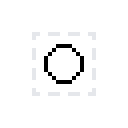
canvas.setColor(color.white)
canvas.circle(100, 100, 25)

canvas.setColor(color.white)
canvas.filledCircle(100, 100, 25)
Lines
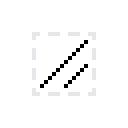
canvas.setColor(color.white)
canvas.line(10, 10, 100, 100)
Pass more pairs to draw a connected path in one call:
canvas.line(10, 10, 100, 100, 190, 10)
Points

canvas.setColor(color.white)
canvas.point(10, 10)
Polygons
canvas.filledPolygon(50, 10, 90, 90, 10, 90)

// or, from a list
canvas.filledPolygon([50, 10, 90, 90, 10, 90])
Draw State
| Method | What it does |
|---|---|
clear([color]) | Fills the whole target with a color, or the background color if none is given. |
setColor(color) / setColor(r, g, b, [a]) | Sets the drawing color. |
getColor() | Returns the current drawing color. |
setBackgroundColor(color) | Sets the color the window is cleared to each frame. |
setLineWidth(n) / getLineWidth() | Thickness of lines and shape outlines. |
setPointSize(n) | Size of points drawn by point(). |
setBlendMode('alpha'|'add'|'multiply'|'none') | How new pixels combine with what is already there. |
setScissor(x, y, w, h) / clearScissor() | Restricts drawing to a rectangle — panels, minimaps, and health bars. |
All of it resets to its defaults before each draw().
Text
canvas.print and canvas.printf draw with the current font. See Font for loading one, and for measuring text.
canvas.print(text, x, y, [rotation, sx, sy, ox, oy])
canvas.printf(text, x, y, limit, ['left'|'center'|'right'], [rotation, sx, sy, ox, oy])
printf wraps at limit pixels and aligns each line within that width.
canvas.setFont(font.system(16))
canvas.print('Score: ' + game.score.toString(), 20, 20)
canvas.printf(dialogue, 40, 200, 400, 'left')
setFont(font) sets the current font, getFont() returns it, and resetFont() goes back to the built-in one. Unlike the rest of the draw state, the current font survives from frame to frame.
Transforms
Coordinates are transformed by whatever is on top of the transform stack. Pushing, transforming, drawing, and popping is how you get cameras, zoom, and screen shake.
function draw() {
  canvas.push()                 // save the current transform
  canvas.scale(3)               // 16px tiles drawn at 48px
  canvas.translate(-camera.x, -camera.y)

  map.draw()                    // world coordinates
  player.draw()

  canvas.pop()                  // back to screen coordinates

  canvas.print('Score', 20, 20) // unaffected by the camera
}
| Method | What it does |
|---|---|
push(['all']) | Saves the transform. With 'all', also saves color, line width, point size, blend mode, and scissor. |
pop() | Restores what the matching push() saved. |
origin() | Resets the transform to the identity. |
translate(x, y) | Moves the origin. |
rotate(radians) | Rotates about the origin. |
scale(x, [y]) | Scales; one argument scales both axes. |
shear(x, y) | Shears. |
toScreen(x, y) | Maps a point through the current transform. |
toWorld(x, y) | Maps a screen point back through it. |
getVisible() | Returns [x, y, width, height]: the part of the current coordinate space that is on screen. |
Transforms compose: canvas.scale(2) after canvas.scale(3) gives 6x, it does not replace the 3x.
toWorld(x, y) and mouse.getWorldPosition() map a screen position back through the current transform, which is how a game finds what the player clicked on while a camera is active.
getVisible() goes the other way. A game with a world larger than the window uses it to loop over only the part of the world the player can see, without redoing the camera's arithmetic itself:
visible = canvas.getVisible()

left = math.max(0, math.floor(visible[0] / tileSize))
right = math.min(map.width - 1, math.ceil((visible[0] + visible[2]) / tileSize))
Render Targets
A target is an off-screen surface you can draw into and then draw like any image.
| What it does | |
|---|---|
new Target(width, height) | Creates a target. |
setTarget([target]) | Directs drawing into a target, or back to the window with no argument. |
screenshot(filename) | Writes the current frame to a PNG. |
Target is a class, imported by name:
import canvas, { Target } from "lumen:canvas"

function load() {
  game.minimap = new Target(120, 120)
}

function draw() {
  canvas.setTarget(game.minimap)
  canvas.clear(color.black)
  drawMap()
  canvas.setTarget()

  game.minimap.draw(window.width - 130, 10)
}
Setting a target resets the transform, because a target is its own screen: (0, 0) is its own corner, not the window's. Clearing it restores the transform the window draws with.
A target's own methods are draw(x, y, [rotation, sx, sy, ox, oy]), getWidth(), getHeight(), and getDimensions().
Quad
A quad is a rectangle of a texture — the region an image or a spritesheet frame is clipped to. new Quad(x, y, w, h) builds one, and sheet.getQuad(frame) hands back the one a spritesheet already made.
import { Quad } from "lumen:canvas"

region = new Quad(0, 0, 16, 16)

sprite.drawQuad(region, x, y)
| Method | What it does |
|---|---|
getX() / getY() | Position within the texture. |
getWidth() / getHeight() | Size of the region. |
setViewport(x, y, w, h) | Moves the region. |
Building one per animation frame up front and reusing it beats allocating one per draw.
Properties
| Property | Value |
|---|---|
canvas.width | Width of the current render target, or of the window when none is set. |
canvas.height | Height of the same. |
Drawing Performance
Sprites are not handed to SDL one at a time. Consecutive draws that share a texture, blend mode, and scissor box are collected into a single call, and any sprite whose transformed corners fall entirely off screen is dropped before it gets that far. A tilemap drawing a few thousand tiles from one tileset costs one call, not a few thousand.
Two things are worth knowing, because both are visible from Ghost:
A primitive between two sprites ends the batch. Batching only ever merges draws with the ones immediately before them, because reordering would put sprites through each other. Drawing a rectangle between every two sprites is therefore correct but slow. Drawing the sprites together and the primitives together is the same picture for a fraction of the calls.
Changing texture ends it too. Sprites clipped from one sheet batch together; alternating between two sheets does not. This is the usual argument for packing a game's art into as few sheets as it can stand.
Neither is something a game has to manage, and neither changes what is drawn — they are the two things that decide whether a frame is one call or a thousand.